Less repeated entry
Reduce the need to copy order, shipment and invoice details between systems. Measure manual touches and corrections against the existing process.

SCP Expertise / Connected operations
Connect orders, stock and delivery information across your business systems, suppliers, warehouse operations and customers.
Connect systems and trading partners
Connect your client systems with suppliers, distribution and warehousing operations, and customers, so orders, stock and delivery information can support the complete business journey.
Your central platform may be an ERP, an order management system or another business application. We start with the information and decisions that need to pass between organisations, then define how EDI, APIs and agreed interfaces will support them.
An established network may already connect many of your suppliers and customers through earlier EDI projects. Connecting your business to that network can reuse existing trading relationships and support international trade. SCP helps establish which connections are needed and how each process variation must work with your systems and data.
Distribution and warehousing may be operated in-house or by a logistics partner. The integration should reflect your operating model and support both warehouse and direct-delivery routes.
Explore the integration model ↓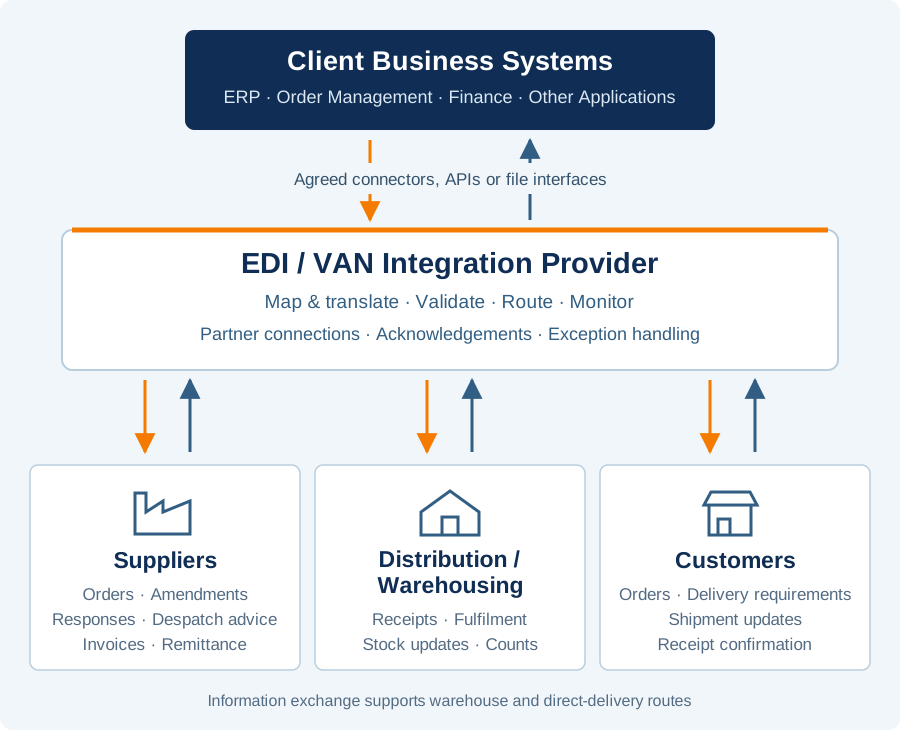
From document exchange to operating control
Electronic Data Interchange (EDI) exchanges structured business documents between organisations’ systems. Instead of retyping an emailed order, a business can receive the order electronically, validate it and create the appropriate transaction in its ERP. The same principle can connect order responses, despatch advice, receipts and invoices.
EDI defines the document exchange; it does not move the goods or replace the business rules around them. A file arriving successfully is different from an order being accepted, stock becoming available or a delivery being received.
Reduce the need to copy order, shipment and invoice details between systems. Measure manual touches and corrections against the existing process.
Use despatch and receipt information to prepare receiving work and investigate differences before they become unresolved stock or invoice queries.
Connect each document to its order, shipment and business owner, so missing responses and rejected transactions have a clear follow-up route.
GS1 describes EDI across ordering, delivery and payment, including order responses and despatch advice. Its guidance links these exchanges to reduced rekeying and more accurate information. GS1 EDI guidance ↗
Using an established network
A value-added network (VAN) provides a managed route for exchanging EDI messages. Broader integration services may also provide translation, ERP connectors, partner onboarding, monitoring and support. Agree which of those services are included: a VAN connection alone does not necessarily include every mapping or application integration.
Many trading partners have used EDI for years and already exchange documents through networks such as TrueCommerce or OpenText. An EDI project can therefore connect a client’s systems into an established trading network, rather than build every partner connection from the beginning. Reusing supported connections and message mappings can reduce repeated onboarding work and help the business trade across countries and partner communities. Confirm the provider’s coverage for the exact partners, locations and transactions required.
SCP helps identify those required connections and assess their fit with the selected provider. We map the process variations—such as direct delivery, warehouse fulfilment, partial shipments, order amendments and returns—and define the data, references and responses needed at each step. We then support design review and end-to-end testing so that information reaches the right system, supports the intended business action and can be reconciled when an exception occurs.
The business case should consider reusable connectivity alongside onboarding effort, manual processing, exception handling and ongoing service costs. An existing network connection is a useful starting point; client-specific data rules and operating processes still need to be validated.
Check the exact legal entity, site and partner identifier, the supported message versions and whether a connection is direct or through another network.
Check the connector’s supported ERP version, transaction coverage, custom fields and ownership of any changes. Include supplier purchasing and warehouse workflows as well as customer orders.
Agree monitoring, support hours, escalation, retention, recovery and exit arrangements. Compare setup, mapping, partner, document-volume and recurring charges.
IBM describes a VAN as an exchange network that can work with separate integration software. OpenText describes a wider platform spanning EDI, APIs, managed file transfer and ERP connections. These are different service boundaries to check during selection. IBM Sterling VAN ↗ · OpenText Trading Grid ↗
Trading partner integration
A trading-partner integration design brings together client business systems, an integration service provider, suppliers, distribution or warehousing operations and customers. Goods can move through storage or cross-docking, or travel directly from the supplier to the customer. The information flow must support both routes. Distribution and warehousing can be owned and operated by the client or provided by a third-party logistics company (3PL), according to the operating model.
The architecture shows a reusable integration pattern for suppliers, warehouse operations and customers. Bonded-stock and customs processes require separately agreed specialist controls.
| Business exchange | Typical direction | What needs to be clear |
|---|---|---|
| Master data | ERP → Provider → Partners | Items, units, prices where required, supplier/customer/location identities and delivery schedules; agree which system owns each field. |
| Purchase orders and amendments | ERP → Supplier; response → ERP | Original and revised quantities, dates and references. Distinguish receipt of the message from commercial acceptance of the order. |
| Advance shipping / despatch advice | Supplier → ERP and receiving warehouse or customer | What is being shipped, order lines, logistics-unit identifiers and the expected receiving location. |
| Inbound bookings and arrival | Warehouse / Booking process ↔ ERP | Slot, vehicle or consignment reference, arrival time and changes to the expected delivery. |
| Goods receipt and put-away | Warehouse / Customer → ERP | Separate arrival, received quantity, accepted condition and stock released for use. Put-away may be a separate event. |
| Outbound orders and status | ERP → Warehouse; updates → ERP | Pick, pack and dispatch instructions, partial fulfilment, shipment confirmation and delivery confirmation. |
| Inventory | Warehouse / Customer → ERP | Stock adjustments, snapshots and counts, with location, ownership, stock status, timestamp and reconciliation rules. |
| Invoices and remittance | Supplier → ERP; remittance → Supplier | Order/receipt matching, variances and credit handling. Remittance advice communicates payment allocation; it is not the payment itself. |
Not every exchange above must be a traditional EDI message. A managed solution may combine EDI documents, APIs and agreed files. Formats and event granularity depend on each partner’s capabilities. GS1 EANCOM is based on UN/EDIFACT; other partner ecosystems may use X12 or GS1 XML. The message standard, transport method and ERP interface are separate design choices. UNECE UN/EDIFACT ↗ · GS1 message-process guidance ↗
Evidence and provider options
Cranfield, GS1 UK and LCP Consulting’s historical apparel cost-to-serve work identifies EDI ordering, advance shipping information and invoice processing as opportunities to reduce operating effort. Its cost figures are indicative and context-specific; they are not a current saving forecast for another business. Read the cost-to-serve research ↗
TrueCommerce’s published customer-story library describes businesses using integrated EDI to reduce manual order entry and support ERP change. These are vendor-reported accounts, useful for identifying questions and references to investigate, rather than independent proof of the result your organisation will achieve. TrueCommerce customer stories ↗
| Provider example | Capability to investigate | Selection question |
|---|---|---|
| TrueCommerce ↗ | Managed EDI and Business Central integration | Which purchasing, sales and warehouse exchanges are supported by the proposed connector and partner mappings? |
| SPS Commerce ↗ | Retail trading-partner network and fulfilment integration | Does the service cover your particular suppliers, customers, warehouse operations and geography? |
| OpenText Trading Grid ↗ | EDI, API and file-based B2B integration | Which onboarding, translation and operational responsibilities are included in the proposed service? |
| IBM Sterling VAN ↗ | Network exchange alongside integration software | Who provides and maintains the ERP connector, business validation and maps? |
TrueCommerce’s EDI Buyer’s Guide distinguishes network connectivity, web-based EDI, integrated EDI and a fully managed service. That makes an important selection question: will people work in a separate portal, or will validated transactions reach the ERP without repeated entry? OpenText’s EDI and VAN Explained describes a broader network offering spanning partner communities, enterprise integration, monitoring and analytics. In both cases, assess the contracted service against the actual document flows.
| Area to compare | TrueCommerce discussion | OpenText discussion |
|---|---|---|
| ERP and workflows | Demonstrate the proposed ERP connector with purchasing, customer-order and warehouse transactions. | Demonstrate how the selected network and integration services connect to the ERP, including any separate components. |
| Partner onboarding | Confirm which existing partner maps can be reused and who handles new or changed requirements. | Confirm partner-directory coverage, onboarding responsibilities and any inter-network arrangements. |
| Monitoring and support | Agree who investigates rejected documents and who corrects business data. | Agree the monitoring service, alert ownership and traceability from network delivery to application acceptance. |
| Commercial scope | Obtain a priced partner/message schedule, change allowances and support commitments. | Obtain a priced breakdown of network, managed integration, onboarding and optional capabilities. |
The two guides inform these evaluation questions; brochure descriptions are not a substitute for a scoped proposal and demonstration. TrueCommerce integration information ↗ · OpenText service information ↗
Gartner’s Magic Quadrant research positions providers within a defined market and research date. Use the market definition, business scope and evaluation criteria alongside your own requirements; a position on a chart does not establish suitability for a particular ERP, partner community or service budget. Gartner’s methodology ↗
Related research includes Gartner’s Market Guide for Multienterprise Collaboration Networks, published 10 December 2024. This broader category covers collaboration across organisations, rather than just EDI document transport. Check the relevant research edition before comparing providers. Gartner report abstract ↗
Provider descriptions checked 30 October 2026 against their own documentation. Examples for evaluation, not a ranking or an assertion of an SCP partnership. Scope and commercial terms need confirmation with each provider.
How SCP can support the work
Map the current and target flow. Build a partner/message matrix, Business Requirements Document, interface specifications and field mappings. Review provider functional designs and agree ownership through a RACI.
Requirements and acceptance criteria →Test the ERP configuration, partner mappings and complete journey through SIT and business UAT. Include duplicates, missing acknowledgements, amendments, partial receipts, invalid units, timeouts and replay after an outage.
Testing and Business Acceptance →Agree cutover, monitoring, reconciliation, support ownership and recovery. Include OAT for alerting, access, performance and restart. Measure accepted transactions, exception age, manual touches and business outcomes.
Programme and delivery controls →A transport acknowledgement confirms a communication step. A syntax acknowledgement confirms a different step. Neither necessarily proves that the ERP posted the document or the business accepted it. Define the statuses, expected response times and owner at each boundary, with a safe correction and replay process that prevents duplicate business transactions.
Start with one partner and a complete order-to-receipt or order-to-invoice journey. Compare the baseline and pilot using the same workload and boundary. A message delivered quickly is useful only if it supports the right business action.